Blog

Archive for the ‘Technology’ Category

PostGIS 2.0 New Features: 3D/4D Indexing

Another feature that has received relatively scant attention in the upcoming release is the ability to index in higher dimensions than the usual two.

Initially I had hoped to made n-dimensional indexing the default, so that multi-dimensional indexes would just automagically be available. Unfortunately it turned out that the overhead involved in having a n-dimensional index key caused the index to be slower.

Rather than slow down the standard use case (2D searching), I re-instated fixed two-dimensional indexing as the default for geometry, and added a new N-D index type for those who want the thrill of extra dimensions.

To build an N-D index, use the following CREATE INDEX statement:

CREATE INDEX my_nd_index
ON my_table USING GIST (geom gist_geometry_ops_nd);

To query your N-D index, use the &&& operator (note! three ampersands!), like so:

SELECT * FROM my_table
WHERE geom &&& 'LINESTRING(0 0 0, 2 2 2)';

(“Hey, what’s with the LINESTRING?” Because the index-only query is bounding-volume based, a linestring from the lower-left to the upper-right of my desired bounding volume will have exactly the bounding volume I want.)

Some of the fancy new 3D functions like ST_3DDistance can make use of the 3D index for fast searches in high dimensional spaces. I imagine folks working with XYT data may also find the new indexes useful.

PostGIS 2.0 New Features: Typmod

The new raster type gets most of the press in the PostGIS 2.0 features round-ups, but one of my personal favorites is the support for “typmod” on geometry objects.

A “typmod” is a “type modifier”. If you’ve used SQL databases you’re probably familiar with type modifiers on variable length character columns, like this one:

CREATE TABLE test (
  description VARCHAR(255)
)

The “255″ after the “VARCHAR” is a modifier, specifying more information about the column. For geometry columns in PostGIS 2.0, it’s now possible to define a column like this:

CREATE TABLE geotbl (
  geom GEOMETRY(PointZ, 4326)
)

Note the modifiers on the geometry, specifying the specific type “Point”, the dimensionality “Z” and the spatial reference identifier “4326″. And the table description reflects the typmod information:

           Table "public.geotbl"
 Column |         Type          | Modifiers
--------+-----------------------+-----------
 geom   | geometry(PointZ,4326) | 

So what, you say? So, now the “geometry_columns” table can automatically be kept up to date as a view on the system tables. Once a spatial table is created, it now automatically appears in “geometry_columns”.

 f_table_catalog | f_table_schema | f_table_name | f_geometry_column | coord_dimension | srid  |      type
-----------------+----------------+--------------+-------------------+-----------------+-------+-----------------
 cded            | public         | geotbl       | geom              |               3 |  4326 | POINT

Still not impressed? The classic problem, “how do I reproject the data in my table” used to require multiple steps: drop spatial reference constraint, update the column, re-add the constraint, refresh the geometry_columns table. Now, it’s a one-liner, converting the contraints, global metadata, and table data in one step.

ALTER TABLE geotbl
  ALTER COLUMN geom
  SET DATA TYPE geometry(Point,26910)
  USING ST_Transform(ST_Force_2D(geom),26910)

And as a bonus, we also converted the type from 3D to 2D. And all the metadata is up-to-date automagically.

           Table "public.geotbl"
 Column |         Type          | Modifiers
--------+-----------------------+-----------
 geom   | geometry(Point,26910) | 

The manual management of the “geometry_columns” table has bothered me ever since it was introduced. After only 10 years, I’m pleased to see it finally fixed! This update required the new extended typmod support brought in to PostgreSQL 8.4 and was prototyped on the “geography” type in PostGIS 1.5.

Flattening the Peel

A PostGIS user asked me an interesting question this week, looking for the intersection of these two polygons:

POLYGON((170 50,170 72,-130 72,-130 50,170 50))
POLYGON((-170 68,-170 90,-141 90,-141 68,-170 68))

Now, from the coordinate sizes, you can see these shapes are described in longitude/latitude. So naturally you should consider using the PostGIS “geography” type, particularly since the shapes are quite big.

However, when you plug the shape into SQL and try out the calculation:

SELECT ST_AsText(
  ST_Intersection(
    ST_GeogFromText('POLYGON((170 50,170 72,-130 72,-130 50,170 50))'),
    ST_GeogFromText('POLYGON((-170 68,-170 90,-141 90,-141 68,-170 68))')
  ));

You get a bad result:

ERROR: transform: couldn't project point (-170 90 0): tolerance condition error (-20)

Hmm. Transform? This sounds like reprojection. We’re working in geography though, what’s going on? Check the definition of the ST_Intersects(geography, geography) function.

CREATE OR REPLACE FUNCTION ST_Intersection(geography, geography)
  RETURNS geography
  AS 'SELECT
    geography(
      ST_Transform(
        ST_Intersection(
          ST_Transform(
            geometry($1),
            _ST_BestSRID($1, $2)),
          ST_Transform(
            geometry($2),
            _ST_BestSRID($1, $2))
          ), 4326))'
  LANGUAGE 'SQL' IMMUTABLE STRICT;

Crazy stuff. Geographies are being cast to geometry, transformed into a planar projection (magically selected by _ST_BestSRID) intersected, then transformed back into geographics and cast back to geography.

The problem is that _ST_BestSRID is failing to pick an appropriate projection to do the calculation in. Now, there are some shapes that are just too big to pick any projection for, but in this case the shapes are a good deal smaller than a hemisphere. However, they are inconveniently located:

One of them goes all the way up to the pole, but the other extends moderately far south. The “best SRID” routine evaluates first whether the shapes can fit into a single UTM zone (they can’t), if they are sufficiently far north to use a polar stereographic (only one is), and finally falls back to a world mercator projection. But, one of the shapes goes up to the pole (which mercator places at infinity), so in the end even the mercator projection fails.

What to do? In order to accurately derive a new shape in planar space that reflects the result on the sphere, we need a projection that represents great circles (used to connect points on the sphere) as straight lines (used to connect points on the plane). We need a Gnomic projection.
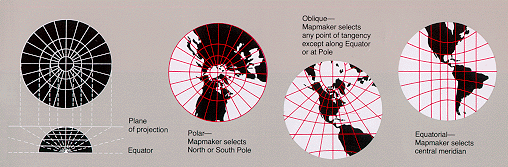
Fortunately the projection library underneath PostGIS — Proj4 — supports the gnomic projection. Now, we need a gnomic projection that is parameterized to optimally fit our geography shapes. The approximate center of the two shapes falls at (-160, 70) so we’ll use that as the center of the projection.

Now we insert a record into the PostGIS “spatial_ref_sys” table, giving our new projection an identifier number of 55000:

INSERT INTO spatial_ref_sys (srid, proj4text)
VALUES (55000, '+proj=gnom +lat_0=70 +lon_0=-160');

Now we can run the intersection again, this time in our specially chosen gnomic:

WITH shapes AS
(
SELECT
  ST_GeogFromText('POLYGON((170 50,170 72,-130 72,-130 50,170 50))') AS p1,
  ST_GeogFromText('POLYGON((-170 68,-170 90,-141 90,-141 68,-170 68))') AS p2
)
SELECT ST_AsText(
  geography(ST_Transform(
    ST_Intersection(
      ST_Transform(geometry(p1), 55000),
      ST_Transform(geometry(p2), 55000)
  ),4326)))
FROM shapes;

And this time we get a result:

POLYGON((-169.908 74.035,-141.155 73.424,-141 68,-170 68,-169.908 74.035))

As you can see eyeballing the globe above the resultant shape should have four corners (check), the southern two corners should be the southern two corners of the second input shape (check), and the northern two corners should be derived from the intersection of the northern edge of the first shape and the eastern/western edges of the second (check).

Astute readers of the geometry text will note that the northern edge of the first shape runs from (170 72) to (-130 72): why doesn’t the north edge of the derived shape fall on the 72d parallel? Because the shortest path between those points doesn’t run along the parallel, it’s a great circle arc that stretches to the north along its path.

This example has made it clear to me that the “best SRID” code needs a little upgrade, so that the logic first checks if UTM is acceptable, then switches into finding a best gnomic, and only breaks down and tries mercator if the shape is drastically too large to fit in a hemisphere.

“Best SRID” finding will always remain a hack, and direct math on the sphere is preferable, but for now we only have a few operations implemented on the sphere (area, length, distance) so we need some hacks to get our work done.
Down with Podal!

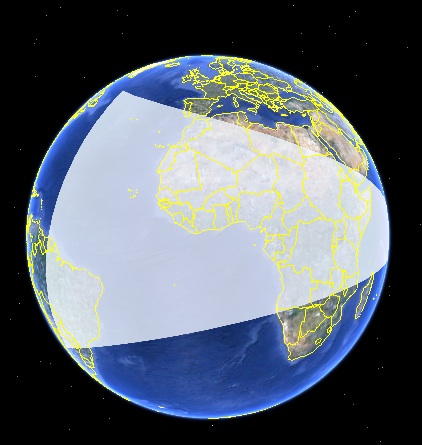
Are you anti-podal? So are many geographic edges!

Actually, not many, but it feels like a common first test case people try when they start playing with the geography type. “How far is it between 0,0 and 180,0?”

There’s a big problem with anti-podal edges though: they don’t have a determinate path. That is, to get from (0,0) to (180,0) it doesn’t matter what direction you travel, just start moving. Any other pairing of points generates a single great circle describing the shortest path joining them. So anti-podal points make very bad components of geometry: they don’t define a path, and they can’t bound an area, because only the end points have a determinate location.

Which brings me to my problem. How do I handle geography objects in PostGIS that include anti-podal segments? On the one hand, since they are impossible to do calculations against, I should just disallow them in all cases, and throw an error. On the other hand, people think they have meaning and stick them into functions all the time. There are also a few functions (like ST_Length) where it’s actually possible to calculate a valid answer given an antipodal input (because we know that antipodal points are exactly one half-circumference apart, even if we don’t know what direction someone might travel between them).

What do you think? Is there a best answer? Comments most welcome!

Building on the Chain, Gang.

Programming languages haven’t changed much over the years: the latest languages to take over large swathes of the industry (Java and C#) are unashamed about being cleaned-up versions of C++, which itself was a melding of C with object concepts. What has changed immensely recently is the state of the art in how large programs are built and tested, the “build chain”.

We don’t talk about this much because it isn’t very client-facing, but thanks to the efforts of Justin Deoliveira and Tim Schaub, OpenGeo has a quite robust build environment. Early on in the development on the OpenGeo Suite we found that the number of steps necessary to move from a particular version of the code to an installable and testable artifact was very high—so high that cycles of test/fix/re-test were just too long.

So we automated this chain, and not just the build. Our software is now automatically built out from source code all the way to installers (for Mac OS X and Windows) and packages (for Ubuntu Linux and CentOS Linux) and machine images (for Amazon AWS) every hour. The industry term for what we’re doing is called “continuous integration“.

The complexity of a system that builds multiple components (GeoServer, PostGIS, PostgreSQL, GeoExt, etc.) in multiple languages (C, Java, JavaScript) on multiple operating systems (Linux, OS X, Windows) is quite substantial, but it is all worth it to be able to incorporate a bug fix into a new installer in short order without human intervention. As we have many clients who are depending on our software for their deployments, this reliable turnaround is critical.

Our system has grown so large that we are now devoting a full-time engineer (welcome, Michael Weisman) just to maintaining and improving it. In time, we plan to add even more components and functions into the mix, such as continuous builds of GDAL and continuous unit testing of all components against multiple databases. The benefits in flexibility, quality, and development speed is well worth the investment.

So if you’re looking for us, you’ll find us building on the chain.

It goes up to 2.0

Maybe someday PostGIS will go to 11, but for now, we’re still shooting for 2, point oh. And happily we are getting closer and closer. We have moved to a weekly schedule of alpha releases (this week was alpha3) and have started cleaning down the list of tickets against the 2.0 milestone.

Last month, much of the time spent by me and Sandro Santilli on PostGIS 2.0 preparation was funded by the Humanitarian Information Unit of the US Department of State. So, from the PostGIS development team, and the PostGIS community in general: thanks, HIU! Why is HIU funding PostGIS? Because the kinds of tools that HIU and its partners use for humanitarian response are backed by PostGIS, and they want to see those tools get better. Funding PostGIS development is an economical way to simultaneously raise the capabilities of a whole ecosystem of tools in HIU’s space.

Getting Curvey

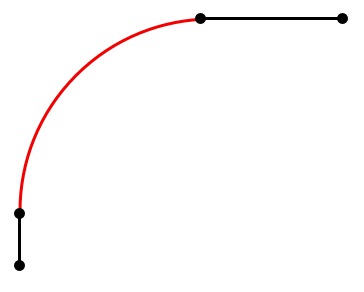
PostGIS has supported curved geometry types — CIRCULARSTRING, COMPOUNDCURVE< CURVEPOLYGON — since version 1.4, but the number of functions that directly calculate against the curved features has remained pretty small. You can generate a bounding box, or calculate a length, but that’s about it.

A COMPOUNDCURVE made up of a line string, a circular arc, and another line string.

In order to do more complex calculations like area calculation or intersections, you have to first convert the curved object into a linearized approximation, using the ST_CurveToLine function. This is fine for functions that return numbers (like ST_Area) or booleans (like ST_Intersects), but what about functions that return derived geometries?

Linearized version of the compound curve. The arc has been replaced by a regular collection of lines.

For derived geometries, the result will be linearized like the inputs. But portions of the geometry will be linearized versions of the original curves: wouldn’t it be nice to have those curves back for storage?

Yes, it would which is why ST_LineToCurve exists. The line to curve logic works on the premise that a linearized version of a curve will have a certain amount of regularity in it.

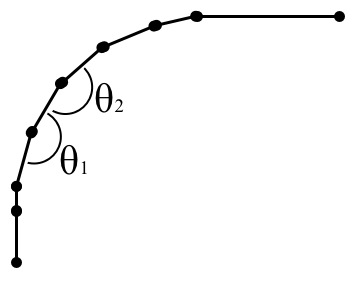
The version of the code from PostGIS 1.4 and 1.5 works by looking at the angles between successive segments. Segments that share an angle of deflection with neighbours are probably components of a circular arc. This worked OK, but the code involved a fair amount of trigonometry.

By looking at angles between edges, you can find edges that are former components of an arc.

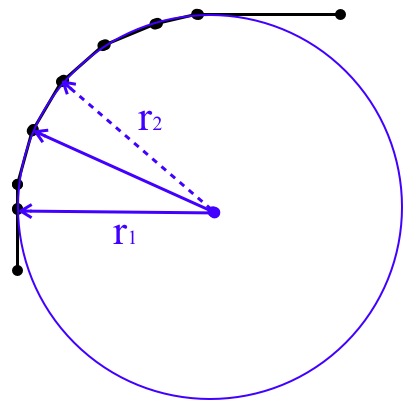
A simpler approach used for 2.0 turned out to be looking at the circle the arc is inscribed on. Any circular arc in PostGIS is defined by a start point, mid point and end point. Between them, they imply a circle, and the center of the circle can be calculated. Any successive point which is the same distance from that center point as the arc points can be considered part of the arc.

By using the circle as a basis for comparison, each successive point needs a simple distance check, instead of a trig check.

The new code is a lot simpler, and can deal with derived segments of more variable length that the old code.

The simplest way to prove that it works is to wrap a curved geometry in multiple nests of ST_LineToCurve and ST_CurveToLine, pushing the geometry back and forth between representations. While the functions are not perfect inverses (the segmentization routine doesn’t necessarily include the middle control points of the input arcs) you can see that the space bounded by the geometries does not change.

Happy curving!

GeoExt Code Sprint - Spring

OpenGeo is always eager to help advance open source geospatial software projects. When Andreas Hocevar told us that the GeoExt community was planning a code sprint for GeoExt 2.0 we were happy to get involved. The sprint is still in the planning stages and, unfortunately, not fully funded. Though many have contributed, we’re hoping others will join us in sponsoring this event.

GeoEXT and ExtJS 4
GeoExt enables building desktop-like GIS applications through the web. It is a Javascript framework that combines the GIS functionality of OpenLayers with the user interface of the ExtJS library provided by Sencha. GeoExt currently works with ExtJS 3 but that does not utilize the new features in ExtJS 4 (charting, harmonized API with Sencha Touch for mobile applications, and others). The upcoming code sprint will target developing GeoExt 2.0 to work with ExtJS 4 in order to leverage the newest features.

Participants
Representatives from the following companies have confirmed attendance and sponsorship:

  • OpenGeo
  • Camptocamp
  • terrestris
  • Mapgears

These organizations have provided core developers for GeoExt 1.x and have experience as service providers building applications with ExtJS 4. We’re excited to work with them again as we help develop GeoExt 2.0

Sponsor search
A week-long gathering of eight developers calls for a budget of $52,000. This covers travel, accommodations and partly the developers themselves. While much of this cost is being borne by the participating organizations we have not been able to close the gap.

We are looking for sponsors to help. Sponsors will be named explicitly and are encouraged to input their priorities for desired functionality in GeoExt 2.0.

Call for sponsorship
The participating organizations would like to invite all organizations and users utilizing GeoExt to sponsor the code sprint. Becoming a sponsor ensures the benefits from the new functions that will be implemented.

OpenGeo Suite now on GitHub

The OpenGeo Suite team has migrated all of our source code over to Git from Subversion, and we are now hosting the code on GitHub. This follows the trend of lots of open source software projects toward a distributed version control system.

Switching from Subversion to Git has all sorts of benefits for the development team, as well for anyone interested in playing with the code. There are numerous sites that detail the advantages of Git (we particularly like this one), but it will allow us to more easily incorporate features for our clients, manage multiple release streams, and work simultaneously without breaking development for everyone else. As the client base of the OpenGeo Suite grows (and as more and more people download the free Community Edition) this change has been a long time in coming.

You can also visit OpenGeo’s main GitHub repository as well as the main repositories for GeoExplorer, GXP, and more. Please fork the code and play around. If you have patches, feel free to send us a pull request. While we can’t guarantee that all patches will be accepted, we value every suggestion we receive.

If you have thoughts about our svn to git conversion, we’d love to hear about in the comments section. Though please, no x-is-better-than-y wars. Each one of us is correct!

Why choose? A hybrid approach to GIS

Earlier this year Esri released a white paper highlighting the benefits of open source and open specifications. No, that wasn’t a joke; the article is real, and well worth a read. It is a solid summation of open source in the marketplace and discusses the differences between open source software and open standards (what Esri calls “open specifications”). But more fundamentally, in this paper, Esri makes a bold and sensible claim that may surprise some people:

Deciding between open source and ArcGIS is not an either/or question. Esri encourages users to choose a hybrid model, a combination of open source and closed source technology, based on their needs.

The paper goes on to talk about Esri’s integration with various open source projects, from their ArcGIS Editor for OpenStreetMap, to their integration of Python into ArcGIS 10 (ArcPy), to their Geoportal Server, which is hosted on SourceForge. On the use of hybrid technology, we are in firm agreement. From the beginning, we have designed our software with integration in mind. For example, the OpenGeo Suite can connect to a number of proprietary databases, including ArcSDE, Oracle Spatial, IBM DB2, and Microsoft SQL Server, and the list continues to grow. In addition, with GeoCat Bridge you can publish data from ArcGIS Desktop to the web with the OpenGeo Suite.

Why would we advocate for proprietary systems? Simply put, we always suggest using the right tool for the job. Esri has great desktop tools, but on the server side there are faster, more reliable, more flexible options that support more standards. It can make sense to use ArcGIS Desktop and then use GeoCat Bridge to publish directly to the OpenGeo Suite. Or to use ArcSDE for data collaboration, then connect to the OpenGeo Suite to serve to the web. We know you have options when choosing any piece of software: Apache Tomcat versus IBM WebSphere, PostgreSQL versus Oracle Spatial, QGIS or uDIG versus ArcGIS Desktop, and, of course, the OpenGeo Suite versus ArcGIS Server. While we feel that open source holds the best route forward for software development, we are happy to give advice on the pros and cons of various architectures. The OpenGeo Suite Enterprise Edition clients use a variety of solutions that meet their needs. We’ll be publishing some white papers in the near future to help you compare the different software options in the marketplace; and we applaud Esri for their moves toward open source, and appreciate their candor in promoting a hybrid model.