Blog

Posts Tagged ‘postgis’

PostGIS 1.5.4 Released

The 1.5 series is still receiving maintenance releases, and today marks another one. Here’s the official news file:

 This is a bug fix release, addressing issues that have been
 filed since the 1.5.3 release.
 - Bug Fixes
   - #547, ST_Contains memory problems (Sandro Santilli)
   - #621, Problem finding intersections with geography (Paul Ramsey)
   - #627, PostGIS/PostgreSQL process die on invalid geometry (Paul Ramsey)
   - #810, Increase accuracy of area calculation (Paul Ramsey)
   - #852, improve spatial predicates robustness (Sandro Santilli, Nicklas Avén)
   - #877, ST_Estimated_Extent returns NULL on empty tables (Sandro Santilli)
   - #1028, ST_AsSVG kills whole postgres server when fails (Paul Ramsey)
   - #1056, Fix boxes of arcs and circle stroking code (Paul Ramsey)
   - #1135, improve testsuite predictability (Andreas 'ads' Scherbaum)
   - #1146, images generator crashes (bronaugh)
   - #1170, North Pole intersection fails (Paul Ramsey)
   - #1179, ST_AsText crash with bad value (kjurka)
   - #1184, honour DESTDIR in documentation Makefile (Bryce L Nordgren)
   - #1227, server crash on invalid GML
   - #1252, SRID appearing in WKT (Paul Ramsey)
   - #1264, st_dwithin(g, g, 0) doesn't work (Paul Ramsey)
   - #1344, allow exporting tables with invalid geometries (Sandro Santilli)
   - #1389, wrong proj4text for SRID 31300 and 31370 (Paul Ramsey)
   - #1406, shp2pgsql crashes when loading into geography (Sandro Santilli)
   - #1595, fixed SRID redundancy in ST_Line_SubString (Sandro Santilli)
   - #1596, check SRID in UpdateGeometrySRID (Mike Toews, Sandro Santilli)
   - #1602, fix ST_Polygonize to retain Z (Sandro Santilli)
   - #1697, fix crash with EMPTY entries in GiST index (Paul Ramsey)
   - #1772, fix ST_Line_Locate_Point with collapsed input (Sandro Santilli)
   - #1799, Protect ST_Segmentize from max_length=0  (Sandro Santilli)
   - Alter parameter order in 900913 (Paul Ramsey)
   - Support builds with "gmake" (Greg Troxel)


The Earth is Not Flat: Volume 2

I really want the geography support in PostGIS to be good, so when I get tickets on it, I take the time to investigate, particularly when they say there are problems with correctness.

This recent ticket took a little while to visualize and confirm, and it’s worth showing so hopefully other folks can debug their issues on their own. The submitter basically said, “look, I have two squares, and I know the smaller one is contained in the larger, and I know that they both contain a marker, and yet when I run containment tests, they say the marker is only contained by the smaller square, but if the larger square contains the smaller it must logically also contain the marker!” And, helpfully, he included the SQL for the tests, which included the squares.

You can see where his concern comes from. The smaller square is inside the larger.

And the marker is inside both.

However, this is a visualization in mercator. The lines between vertices are being drawn as linear interpolations in planar space. The geography calculations involve great circles between vertices in spherical space. What does that look like?

Hm, the lower lines don’t actually line up.

And the marker is actually between the lower lines. It’s contained by the smaller square, but not by the larger one. Just like the geography tests said.

The moral of the story is, we aren’t good at visually reasoning about boundaries on a sphere. Our practice is all cartesian and it causes us to make mistakes.

This is something I learned during the development of geography, when I spent many hours debugging test cases that the code was getting “wrong” only to find in the end that the problem was entirely between my ears. (Example, does POINT(0 1) fall on LINESTRING(-1 1, 1 1)? If you said “yes”, you too have problems between your ears.)

So, plug your problem into KML LineStrings (not Polygons, they aren’t rendered as great circles!) and have a look before reporting correctness issues in geography, please!

HTTP for PostgreSQL

I’m not sure if this falls into the category of “world changing innovation” or “stupid pet tricks”, probably the latter, but earlier this week I published the first revision of a library that lets you make HTTP requests from inside SQL statements.

SELECT status, content_type, content FROM http_get('https://localhost');
 status | content_type |                   content
--------+--------------+----------------------------------------------
    200 | text/html    | <html><body><h1>It works!</h1></body></html>
(1 row)

What good is it? Well, the first non-silly use case I came up with was setting up a geocoding hook so that you can call a geocoding web service as new addresses are added to a table, and this morning I thought I would write it up to see what it looked like.

The Google Geocoding API takes in URLs that look like this:

/maps/api/geocode/xml?sensor=false&address=1234+main+st+chicago

And returns results that look like this:

<?xml version="1.0" encoding="UTF-8"?>
<GeocodeResponse>
 <status>OK</status>
 <result>
  <type>street_address</type>
  <formatted_address>1234 Main St, Evanston, IL 60202, USA</formatted_address>
  <address_component>
   <long_name>1234</long_name>
   <short_name>1234</short_name>
   <type>street_number</type>
  </address_component>
  <address_component>
   <long_name>Main St</long_name>
   <short_name>Main St</short_name>
   <type>route</type>
  </address_component>
  ......
  <geometry>
   <location>
    <lat>41.6372458</lat>
    <lng>-87.5860067</lng>
   </location>
  </geometry>
  <partial_match>true</partial_match>
 </result>
</GeocodeResponse>

The HTTP library can get us the content, and we just need to extract the coordinates. There are all sorts of interesting text processing functions in PostgreSQL, including a full regular expressions system, but for maximum nerdiness it makes sense to process the XML document with the native PostgreSQL XML support (you will need to have your PostgreSQL compiled with XML support for this to work).

Here’s a function that takes in a street address, calls the geocoder, strips out the coordinates and constructs a PostGIS geometry return value.

CREATE OR REPLACE FUNCTION address_to_geom(text)
RETURNS geometry
AS
$$
WITH http AS (
  SELECT status, content_type, content::xml
  FROM http_get('/maps/api/geocode/xml?sensor=false&address=' || replace($1, ' ', '+'))
),
parts AS (
  SELECT
    status, content_type,
    (xpath('//location/lat/text()',content))[1] AS lat,
    (xpath('//location/lng/text()',content))[1] AS lng
  FROM http
)
SELECT
  ST_SetSRID(ST_MakePoint(lng::text::float8, lat::text::float8),4326) AS geom
FROM parts
$$
LANGUAGE 'SQL';

I’m using my new favorite PostgreSQL syntactic sugar, the “WITH” keyword, to order the subqueries from top to bottom so you can read them serially.

First we run the HTTP call, lightly URL-encoding the input address before appending it to the base URL. (Future enhancement, do a real URL encoding.)

Then we extract the coordinates from the XML, using an XPath query! Note that we’re only extracting the first result, but with XPath we could extract them all into arrays if we wished. (Future enhancement, watch the return status and check for web service error conditions at this step.)

Finally we convert the coordinates into a geometry, casting the coordinates from XML to text to float, and then setting the SRID to 4326, since Google only works in WGS84.

Now that we have the function, writing a trigger is trivial.

CREATE TABLE addresses (
  id SERIAL PRIMARY KEY,
  address VARCHAR,
  geom GEOMETRY(Point, 4326)
);
CREATE OR REPLACE FUNCTION update_address_geometry()
RETURNS TRIGGER AS
$$
  BEGIN
  NEW.geom = address_to_geom(NEW.address);
  RETURN NEW;
  END;
$$
LANGUAGE plpgsql;
CREATE TRIGGER address_trigger
  BEFORE UPDATE OR INSERT
  ON addresses
  FOR EACH ROW EXECUTE PROCEDURE update_address_geometry();

Now every time an address is inserted or updated, the associated geometry will be looked up in the geocoding service automagically. What could possibly go wrong? Well, if the Google web service is slow, each insert and update will take as long as the web service, which would not be good in a high-volume environment, to say the least. And as noted above, this example includes no error handling at all. However, it’s a cute trick and I’m sure there will be more to come.

The reason I wrote this little library is to allow PostgreSQL and PostGIS to talk to GeoWebCache directly, so that edits at the database level can inform the caching layer that the cache needs to be updated where the edits have occurred. This is important for any system that uses cached tiles on top of live data. This update will be in the OpenGeo Suite 3.X series, which is coming later this year.

PostGIS 2.0 Released

Today, after 26 months of development (for comparison, an elephant takes only 22 months to gestate a whole new elephant) PostGIS 2.0 was released!

There are a lot of user-visible changes, but it’s also hard to overstate how much changed under the covers: the storage format, the indexes, the parsers and emitters were all re-written. That is, all the code that formed the initial release of PostGIS back was swapped out. It’s all fresh and shiny under the hood. Here’s the official release announcement:

The PostGIS development team is super excited,
can hardly believe that they are actually doing this,
aren't maybe even sure that they are ready to make
this kind of commitment, not so young, and not when
we have so much more living to do, but:
PostGIS 2.0.0 is complete and available for download.
The development process for 2.0 has been very long,
but has resulted in a release with a number of exciting
new features.
 * Raster data and raster/vector analysis in the database
 * Topological models to handle objects with shared boundaries
 * PostgreSQL typmod integration, for an automagical
   geometry_columns table
 * 3D and 4D indexing
 * Index-based high performance nearest-neighbour searching
 * Many more vector functions including
   * ST_Split
   * ST_Node
   * ST_MakeValid
   * ST_OffsetCurve
   * ST_ConcaveHull
   * ST_AsX3D
   * ST_GeomFromGeoJSON
   * ST_3DDistance
 * Integration with the PostgreSQL 9.1 extension system
 * Improved commandline shapefile loader/dumper
 * Multi-file import support in the shapefile GUI
 * Multi-table export support in the shapefile GUI
 * A geo-coder optimized for free US Census
   TIGER (2010) data
We are greatly indebted to our large community of beta testers
who valiantly tested PostGIS 2.0.0 and reported bugs so we could
squash them before release time.
And also we want to thank our parents for making PostGIS possible.
Yours,
The PostGIS development team

In addition to all my colleagues on the PostGIS team, I’d like to also thank OpenGeo, who have given me the time to work on PostGIS over the past couple years.
 

PostGIS 2.0 New Features: ST_MakeValid

The bane of PostGIS users since time immemorial has been the “invalid feature”. An invalid feature is one that disobeys the structural rules of its type. The more complicated the type, the more ways an object can be invalid.

  • Points are never invalid. How can you screw up a point?
  • Linestrings are almost never invalid. Only a two-point line where the start and end are the same is invalid.
  • Polygons have lots of ways to be invalid. Rings have to close. Rings can’t self-intersect. Rings can only touch other rings once, at a point. Inner rings have to be inside outer rings.
  • Polyhedralsurfaces… I don’t have enough space. Imagine a face defined as a 3D polygon and you get the picture. All the rules of polygons, plus rules like requiring all points on all rings to be co-planar.

My favorite invalid polygon (doesn’t everyone have a favorite invalid polygon?) is the figure-eight, because it’s so obviously wrong, and because it demonstrates the importance of validity rules so elegantly.

POLYGON((-1 -1, -1 0, 1 0, 1 1, 0 1, 0 -1, -1 -1))

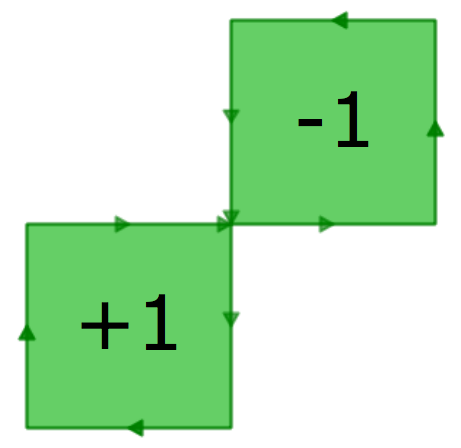
Want to see why validity is important? Run ST_Area() on this polygon. The answer? Zero. The area algorithm expects that rings bound areas using a consistent orientation of edges to the bounded area. But you can see in the figure-eight diagram above, one lobe is bounded by clockwise edges and the other lobe by anti-clockwise edges. So the calculation looks like this:

The way to represent this area validly is with a MultiPolygon consisting of two one-unit squares, so, run ST_MakeValid() and see what comes out!

SELECT ST_AsText(ST_MakeValid('POLYGON((-1 -1, -1 0, 1 0, 1 1, 0 1, 0 -1, -1 -1))'))
MULTIPOLYGON (((-1 -1,-1 0,0 0,0 -1,-1 -1)),((0 0,0 1,1 1,1 0,0 0)))

ST_MakeValid() will try to create a valid output without dropping vertices, so for some invalidities, the result is not exactly what one might like. For example, many hand digitized polygons have very small versions of the figure-eight case embedded in their edges. Users probably just want those little “polygon warts” to go away, but ST_MakeValid() will retain them, as tiny elements of a multipolygon. ST_MakeClean(), to remove small errors using a tolerance, awaits funding from some enterprising organization!

PostGIS 2.0 New Features: 3D/4D Indexing

Another feature that has received relatively scant attention in the upcoming release is the ability to index in higher dimensions than the usual two.

Initially I had hoped to made n-dimensional indexing the default, so that multi-dimensional indexes would just automagically be available. Unfortunately it turned out that the overhead involved in having a n-dimensional index key caused the index to be slower.

Rather than slow down the standard use case (2D searching), I re-instated fixed two-dimensional indexing as the default for geometry, and added a new N-D index type for those who want the thrill of extra dimensions.

To build an N-D index, use the following CREATE INDEX statement:

CREATE INDEX my_nd_index
ON my_table USING GIST (geom gist_geometry_ops_nd);

To query your N-D index, use the &&& operator (note! three ampersands!), like so:

SELECT * FROM my_table
WHERE geom &&& 'LINESTRING(0 0 0, 2 2 2)';

(“Hey, what’s with the LINESTRING?” Because the index-only query is bounding-volume based, a linestring from the lower-left to the upper-right of my desired bounding volume will have exactly the bounding volume I want.)

Some of the fancy new 3D functions like ST_3DDistance can make use of the 3D index for fast searches in high dimensional spaces. I imagine folks working with XYT data may also find the new indexes useful.

PostGIS 2.0 New Features: Typmod

The new raster type gets most of the press in the PostGIS 2.0 features round-ups, but one of my personal favorites is the support for “typmod” on geometry objects.

A “typmod” is a “type modifier”. If you’ve used SQL databases you’re probably familiar with type modifiers on variable length character columns, like this one:

CREATE TABLE test (
  description VARCHAR(255)
)

The “255″ after the “VARCHAR” is a modifier, specifying more information about the column. For geometry columns in PostGIS 2.0, it’s now possible to define a column like this:

CREATE TABLE geotbl (
  geom GEOMETRY(PointZ, 4326)
)

Note the modifiers on the geometry, specifying the specific type “Point”, the dimensionality “Z” and the spatial reference identifier “4326″. And the table description reflects the typmod information:

           Table "public.geotbl"
 Column |         Type          | Modifiers
--------+-----------------------+-----------
 geom   | geometry(PointZ,4326) | 

So what, you say? So, now the “geometry_columns” table can automatically be kept up to date as a view on the system tables. Once a spatial table is created, it now automatically appears in “geometry_columns”.

 f_table_catalog | f_table_schema | f_table_name | f_geometry_column | coord_dimension | srid  |      type
-----------------+----------------+--------------+-------------------+-----------------+-------+-----------------
 cded            | public         | geotbl       | geom              |               3 |  4326 | POINT

Still not impressed? The classic problem, “how do I reproject the data in my table” used to require multiple steps: drop spatial reference constraint, update the column, re-add the constraint, refresh the geometry_columns table. Now, it’s a one-liner, converting the contraints, global metadata, and table data in one step.

ALTER TABLE geotbl
  ALTER COLUMN geom
  SET DATA TYPE geometry(Point,26910)
  USING ST_Transform(ST_Force_2D(geom),26910)

And as a bonus, we also converted the type from 3D to 2D. And all the metadata is up-to-date automagically.

           Table "public.geotbl"
 Column |         Type          | Modifiers
--------+-----------------------+-----------
 geom   | geometry(Point,26910) | 

The manual management of the “geometry_columns” table has bothered me ever since it was introduced. After only 10 years, I’m pleased to see it finally fixed! This update required the new extended typmod support brought in to PostgreSQL 8.4 and was prototyped on the “geography” type in PostGIS 1.5.

Flattening the Peel

A PostGIS user asked me an interesting question this week, looking for the intersection of these two polygons:

POLYGON((170 50,170 72,-130 72,-130 50,170 50))
POLYGON((-170 68,-170 90,-141 90,-141 68,-170 68))

Now, from the coordinate sizes, you can see these shapes are described in longitude/latitude. So naturally you should consider using the PostGIS “geography” type, particularly since the shapes are quite big.

However, when you plug the shape into SQL and try out the calculation:

SELECT ST_AsText(
  ST_Intersection(
    ST_GeogFromText('POLYGON((170 50,170 72,-130 72,-130 50,170 50))'),
    ST_GeogFromText('POLYGON((-170 68,-170 90,-141 90,-141 68,-170 68))')
  ));

You get a bad result:

ERROR: transform: couldn't project point (-170 90 0): tolerance condition error (-20)

Hmm. Transform? This sounds like reprojection. We’re working in geography though, what’s going on? Check the definition of the ST_Intersects(geography, geography) function.

CREATE OR REPLACE FUNCTION ST_Intersection(geography, geography)
  RETURNS geography
  AS 'SELECT
    geography(
      ST_Transform(
        ST_Intersection(
          ST_Transform(
            geometry($1),
            _ST_BestSRID($1, $2)),
          ST_Transform(
            geometry($2),
            _ST_BestSRID($1, $2))
          ), 4326))'
  LANGUAGE 'SQL' IMMUTABLE STRICT;

Crazy stuff. Geographies are being cast to geometry, transformed into a planar projection (magically selected by _ST_BestSRID) intersected, then transformed back into geographics and cast back to geography.

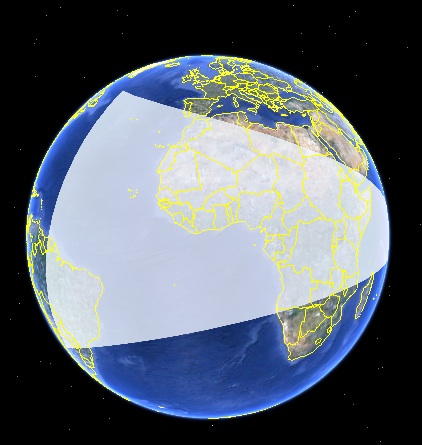
The problem is that _ST_BestSRID is failing to pick an appropriate projection to do the calculation in. Now, there are some shapes that are just too big to pick any projection for, but in this case the shapes are a good deal smaller than a hemisphere. However, they are inconveniently located:

One of them goes all the way up to the pole, but the other extends moderately far south. The “best SRID” routine evaluates first whether the shapes can fit into a single UTM zone (they can’t), if they are sufficiently far north to use a polar stereographic (only one is), and finally falls back to a world mercator projection. But, one of the shapes goes up to the pole (which mercator places at infinity), so in the end even the mercator projection fails.

What to do? In order to accurately derive a new shape in planar space that reflects the result on the sphere, we need a projection that represents great circles (used to connect points on the sphere) as straight lines (used to connect points on the plane). We need a Gnomic projection.
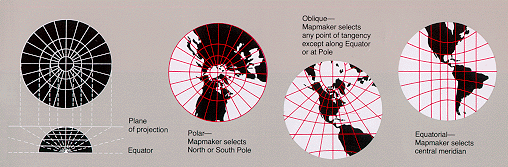
Fortunately the projection library underneath PostGIS — Proj4 — supports the gnomic projection. Now, we need a gnomic projection that is parameterized to optimally fit our geography shapes. The approximate center of the two shapes falls at (-160, 70) so we’ll use that as the center of the projection.

Now we insert a record into the PostGIS “spatial_ref_sys” table, giving our new projection an identifier number of 55000:

INSERT INTO spatial_ref_sys (srid, proj4text)
VALUES (55000, '+proj=gnom +lat_0=70 +lon_0=-160');

Now we can run the intersection again, this time in our specially chosen gnomic:

WITH shapes AS
(
SELECT
  ST_GeogFromText('POLYGON((170 50,170 72,-130 72,-130 50,170 50))') AS p1,
  ST_GeogFromText('POLYGON((-170 68,-170 90,-141 90,-141 68,-170 68))') AS p2
)
SELECT ST_AsText(
  geography(ST_Transform(
    ST_Intersection(
      ST_Transform(geometry(p1), 55000),
      ST_Transform(geometry(p2), 55000)
  ),4326)))
FROM shapes;

And this time we get a result:

POLYGON((-169.908 74.035,-141.155 73.424,-141 68,-170 68,-169.908 74.035))

As you can see eyeballing the globe above the resultant shape should have four corners (check), the southern two corners should be the southern two corners of the second input shape (check), and the northern two corners should be derived from the intersection of the northern edge of the first shape and the eastern/western edges of the second (check).

Astute readers of the geometry text will note that the northern edge of the first shape runs from (170 72) to (-130 72): why doesn’t the north edge of the derived shape fall on the 72d parallel? Because the shortest path between those points doesn’t run along the parallel, it’s a great circle arc that stretches to the north along its path.

This example has made it clear to me that the “best SRID” code needs a little upgrade, so that the logic first checks if UTM is acceptable, then switches into finding a best gnomic, and only breaks down and tries mercator if the shape is drastically too large to fit in a hemisphere.

“Best SRID” finding will always remain a hack, and direct math on the sphere is preferable, but for now we only have a few operations implemented on the sphere (area, length, distance) so we need some hacks to get our work done.
Down with Podal!

Are you anti-podal? So are many geographic edges!

Actually, not many, but it feels like a common first test case people try when they start playing with the geography type. “How far is it between 0,0 and 180,0?”

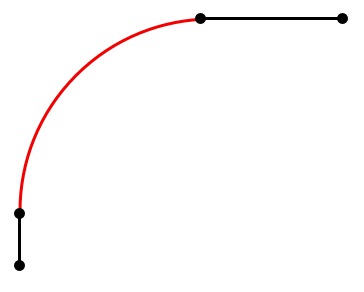
There’s a big problem with anti-podal edges though: they don’t have a determinate path. That is, to get from (0,0) to (180,0) it doesn’t matter what direction you travel, just start moving. Any other pairing of points generates a single great circle describing the shortest path joining them. So anti-podal points make very bad components of geometry: they don’t define a path, and they can’t bound an area, because only the end points have a determinate location.

Which brings me to my problem. How do I handle geography objects in PostGIS that include anti-podal segments? On the one hand, since they are impossible to do calculations against, I should just disallow them in all cases, and throw an error. On the other hand, people think they have meaning and stick them into functions all the time. There are also a few functions (like ST_Length) where it’s actually possible to calculate a valid answer given an antipodal input (because we know that antipodal points are exactly one half-circumference apart, even if we don’t know what direction someone might travel between them).

What do you think? Is there a best answer? Comments most welcome!

It goes up to 2.0

Maybe someday PostGIS will go to 11, but for now, we’re still shooting for 2, point oh. And happily we are getting closer and closer. We have moved to a weekly schedule of alpha releases (this week was alpha3) and have started cleaning down the list of tickets against the 2.0 milestone.

Last month, much of the time spent by me and Sandro Santilli on PostGIS 2.0 preparation was funded by the Humanitarian Information Unit of the US Department of State. So, from the PostGIS development team, and the PostGIS community in general: thanks, HIU! Why is HIU funding PostGIS? Because the kinds of tools that HIU and its partners use for humanitarian response are backed by PostGIS, and they want to see those tools get better. Funding PostGIS development is an economical way to simultaneously raise the capabilities of a whole ecosystem of tools in HIU’s space.