Blog

Posts Tagged ‘geoexplorer’

OpenGeo Suite 2.4.5 released

We are excited to release a new version of the OpenGeo Suite! In order to capture the many improvements and bug fixes happening in the open source community, we are moving toward a more rapid release cycle. For example, GeoServer now has JDBC datastore session startup/teardown SQL comments, as well as support for paletted PNG images with alpha transparency.

In GeoExplorer (which really is pretty amazing, if you haven’t seen it recently) there is now smoother tile display, including fade-in. Also, the map legend has now been integrated directly into the layer tree. Finally, we have changed the default base layer to be MapQest OSM, moving away from Google (though Google base layers are still available).

All of these new features are available in the Community Edition, Enterprise Edition (which includes a free 30 day trial of our support), and all Cloud Editions! Try any version you’d like

OpenGeo Suite 2.4.4 released

The OpenGeo team is excited to announce the release of OpenGeo Suite 2.4.4. This is the first new version in a few months so there have been lots of stability improvements and updates.

GeoServer incorporates the new features from the recently released GeoServer 2.1.3. It now has Basic HTTP authentication for cascaded WMS servers, a feature that has been asked for by a number of our clients. GeoServer also has support for non-advertised layers, with layers configured and active, yet not publicized in the capabilities documents. For our European friends, we’ve made enhancements to the View Service for the GeoServer INSPIRE extension.

The GeoServer-embedded GeoWebCache now has a significantly improved UI, exposing many options previously only configurable via a text editor. It’s now possible to add a new layer, configure tile size, view disk quotas, enable GWC services and cache formats.

GeoExplorer has improved stability when deployed under Glassfish and WebSphere containers. Logout functionality has now been exposed, based on many user requests. In general, GeoExplorer now has a faster loading of JavaScript resources.

The OpenGeo Suite is and continues to be 100% open source and we’ve migrated the source code onto GitHub to improve our development process and make it easier for anyone to check out our source code.

We invite everyone to check out our new release—register for a trial of the Enterprise Edition or download the free (but unsupported) Community Edition. If you’re looking for support, unlimited bug fixes, access to core developers, updates, telephone support, and even custom development hours, we invite you to consider becoming an OpenGeo Suite Enterprise Edition client.

Thanks to everyone who submitted bug reports and feature requests. Thanks as well to all developers involved in our component projects. Finally, thanks to our current Enterprise Edition clients, who enable to us to continue to develop the best geospatial software.

OpenGeo Suite now on GitHub

The OpenGeo Suite team has migrated all of our source code over to Git from Subversion, and we are now hosting the code on GitHub. This follows the trend of lots of open source software projects toward a distributed version control system.

Switching from Subversion to Git has all sorts of benefits for the development team, as well for anyone interested in playing with the code. There are numerous sites that detail the advantages of Git (we particularly like this one), but it will allow us to more easily incorporate features for our clients, manage multiple release streams, and work simultaneously without breaking development for everyone else. As the client base of the OpenGeo Suite grows (and as more and more people download the free Community Edition) this change has been a long time in coming.

You can also visit OpenGeo’s main GitHub repository as well as the main repositories for GeoExplorer, GXP, and more. Please fork the code and play around. If you have patches, feel free to send us a pull request. While we can’t guarantee that all patches will be accepted, we value every suggestion we receive.

If you have thoughts about our svn to git conversion, we’d love to hear about in the comments section. Though please, no x-is-better-than-y wars. Each one of us is correct!

OpenGeo Suite Community Edition 2.4.1 released

OpenGeo Suite Community Edition

We are happy to announce the release the OpenGeo Suite Community Edition 2.4.1!

It’s been a few months since we’ve put out a new version of the OpenGeo Suite Community Edition, but that’s not for lack of work. We’ve been quite busy not only adding new features, but melding in some of the great improvements that the Enterprise Edition received last month. Check it out:

Integrated styling and editing in GeoExplorer. We love the Styler and GeoEditor apps, but we thought that things would be that much better if we could integrate the styling and editing functionality directly into GeoExplorer. This means that now GeoExplorer can do more than just map composition and publishing. Much more.

Upload data through GeoExplorer. You can now upload single shapefiles and GeoTIFFs directly through the GeoExplorer interface, and the content will be loaded into GeoServer just as with the standard GeoServer Layer Importer. Yet another addition to the already powerful application, this will help you minimize switching between different applications for your data management.

GeoExplorer authentication. You wouldn’t want to give everyone the keys to the GeoExplorer kingdom, would you? We didn’t think so, so anything that requires server changes (styling, saving) now requires you to log in using administrator credentials.

Latest updates. Of course, all of the latest versions and bugfixes from our component projects comes standard.

We invite everyone to download this new version and give it a test drive. Please report any bugs to the OpenGeo Suite Community Forum. While the Community Edition is unsupported, we appreciate any reports from the field, and so will fellow members of our growing community.

Download the OpenGeo Suite Community Edition 2.4.1.

MapQuest Imagery and OSM Tiles in GeoExplorer

Last week MapQuest announced the addition of aerial imagery to the the tile sets they provide through their open tiles service. Today, we’re excited to announce a new Community Edition of the Suite that provides access to these beautiful imagery and OSM layers in GeoExplorer.

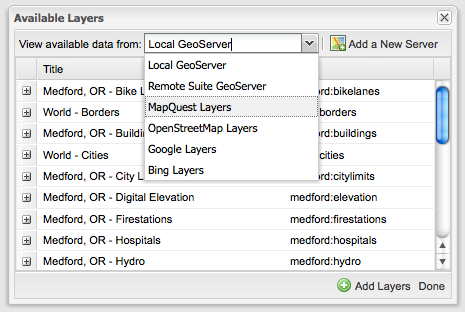
GeoExplorer is configured by default to allow the addition of these MapQuest layers. You can access them (along with other layer sources) through the “Add Layers” dialog.

Add Layers Dialog

The Open Aerial tiles allow you to layer your own data over a nice composite of imagery from NASA JPL and the National Agriculture Imagery Program (in the contiguous U.S.)

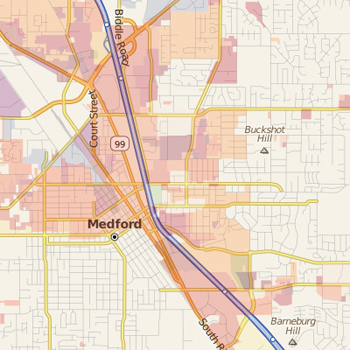
Open Aerial Imagery

The OpenStreetMap layer is particularly useful in layering your own thematic data over MapQuest’s rendering of OSM data.

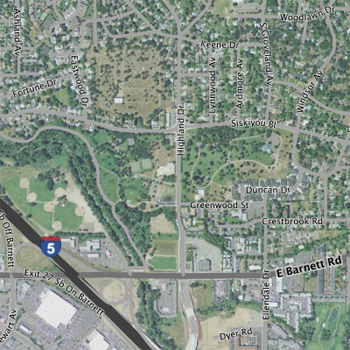
OpenStreetMap Tiles

MapQuest make things easy for developers by not requiring an API key to use these newly available layers in their applications. Thanks to MapQuest for providing access to this data.

GeoExplorer: Browse, Interact, Publish

We’ve put together another release of the GeoExplorer application built with GeoExt. This release includes some great new features that let you explore WMS layers from multiple sources and publish your results as an embedded map in any web page.

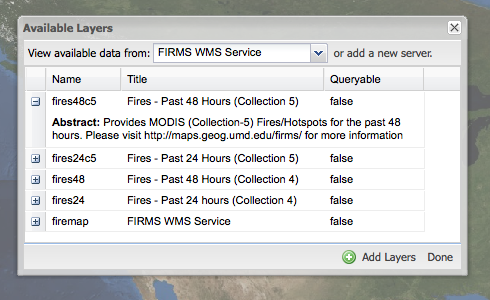
The updated “available layers” dialog allows you to choose from a list of currently configured sources or add your own.

Add Layers Dialog

In this case, I’ve decided to create a simple map showing fire locations and current weather conditions in the US. For the fire locations, I added the Firefly service from the Geography Department at the University of Maryland. To get a sense for current weather conditions nationwide, I added radar reflectivity data from Iowa State University Department of Agronomy.

Clicking on the publish button launches a new dialog for configuring the map export. The result is an HTML snippet that I can include in any web page - like this one:

You can download the application archive to set it up on your own server, or try out the demo we’ve put up.